

Development#
To create a model, inherit from ModelBase and use
AstroField() to add field metadata, which can include things
like UCDs, and fits and IVOA keyword mappings. For PlantUML diagrams, you
can optionally add namespaces to your classes by adding a _namespace
attribute.
from enum import StrEnum, auto, nonmember
from typing import ClassVar

import astropy.units as u
import ctao_datamodel as dm
from astropydantic import AstroPydanticTime


class AnEnumOption(StrEnum):
    """An option."""

    _namespace = nonmember("Example")  # PlantUML namespace

    ONE = auto()
    TWO = auto()
    THREE = auto()


class SubModel(dm.ModelBase):
    "An example sub-model."

    _namespace: ClassVar = "Example.Models"

    option: AnEnumOption | None = dm.AstroField(description=dm.enum_doc(AnEnumOption))
    energy_min: dm.Quantity[u.TeV] = dm.AstroField(
        description="A value with a unit and FITS keyword mapping",
        fits_keyword="E_MIN",
    )


class MyModel(dm.ModelBase):
    """An example model."""

    start_time: AstroPydanticTime = dm.AstroField(
        description="The time",
        fits_keyword="TSTART",
        examples=["2025-10-02 15:23:32.12", "2025-10-02T15:23:32.12"],
    )
    value: float
    sub: SubModel
You can inspect the model:
dm.print_model(MyModel)
Element                         : Type                           :Opt: Parent Relation
=====================================================================================
 mymodel                        : MyModel                        :   : none
   start_time                   : Time                           :   : contains
   value                        : float                          :   : contains
   sub                          : SubModel                       :   : contains
     option                     : AnEnumOption                   : * : contains
     energy_min                 : Quantity                       :   : contains
Unit Quantities#
Specifying units is done by using the dm.Quantity type. Note that this is not the same as using the astropy.units.Quantity as a type; instead it is a wrapper that allows astropy quantities to be serialized in different formats.
JSONSchema output#
You can just use the built-in Pydantic functionality to generate JSONSchema, and note that the special field metadata like unit and fits_keyword are included automatically
import json

print(json.dumps(MyModel.model_json_schema(), indent=2))
{
  "$defs": {
    "AnEnumOption": {
      "description": "An option.",
      "enum": [
        "one",
        "two",
        "three"
      ],
      "title": "AnEnumOption",
      "type": "string"
    },
    "SubModel": {
      "additionalProperties": false,
      "description": "An example sub-model.",
      "properties": {
        "option": {
          "anyOf": [
            {
              "$ref": "#/$defs/AnEnumOption"
            },
            {
              "type": "null"
            }
          ],
          "description": "An option. Options are: \"one\", \"two\", \"three\"."
        },
        "energy_min": {
          "anyOf": [
            {
              "properties": {
                "value": {
                  "type": "number"
                },
                "unit": {
                  "type": "string"
                }
              },
              "required": [
                "value",
                "unit"
              ],
              "type": "object"
            },
            {
              "type": "string"
            },
            {
              "type": "number"
            }
          ],
          "description": "A value with a unit and FITS keyword mapping",
          "fits_keyword": "E_MIN",
          "title": "Energy Min",
          "unit": "TeV"
        }
      },
      "required": [
        "option",
        "energy_min"
      ],
      "title": "SubModel",
      "type": "object"
    }
  },
  "additionalProperties": false,
  "description": "An example model.",
  "properties": {
    "start_time": {
      "anyOf": [
        {
          "type": "string"
        },
        {
          "type": "number"
        },
        {
          "format": "date-time",
          "type": "string"
        }
      ],
      "description": "The time",
      "examples": [
        "2025-10-02 15:23:32.12",
        "2025-10-02T15:23:32.12"
      ],
      "fits_keyword": "TSTART",
      "title": "Start Time"
    },
    "value": {
      "title": "Value",
      "type": "number"
    },
    "sub": {
      "$ref": "#/$defs/SubModel"
    }
  },
  "required": [
    "start_time",
    "value",
    "sub"
  ],
  "title": "MyModel",
  "type": "object"
}
Model Instances#
When you construct an instance of the model, you also get some nice functions to turn it into flat metadata, for example:
m = MyModel(
    start_time="2025-10-10 15:23:23.2",
    value=6.2,
    sub=SubModel(option="two", energy_min=100.0 * u.GeV),  # note units are converted!
)
flat = dm.flatten_model_instance(m, quantity_format="string")
flat
{'start_time': '2025-10-10T15:23:23.200000000',
 'value': 6.2,
 'sub.option': 'two',
 'sub.energy_min': '0.1 TeV'}
dm.unflatten_model_instance(flat, MyModel)
MyModel(start_time=<Time object: scale='utc' format='isot' value=2025-10-10T15:23:23.200>, value=6.2, sub=SubModel(option=<AnEnumOption.TWO: 'two'>, energy_min=<Quantity 0.1 TeV>))
This works for other quantity formats:
flat = dm.flatten_model_instance(m, quantity_format="dict")
flat
{'start_time': '2025-10-10T15:23:23.200000000',
 'value': 6.2,
 'sub.option': 'two',
 'sub.energy_min.value': 0.1,
 'sub.energy_min.unit': 'TeV'}
dm.unflatten_model_instance(flat, MyModel)
MyModel(start_time=<Time object: scale='utc' format='isot' value=2025-10-10T15:23:23.200>, value=6.2, sub=SubModel(option=<AnEnumOption.TWO: 'two'>, energy_min=<Quantity 0.1 TeV>))
m.sub.energy_min
PlantUML and LaTeX output#
You can turn this model into PlantUML diagrams and LaTeX tables:
dm.generate_latex_table_includes([MyModel, SubModel], "./generated/includes")
dm.generate_plantuml_diagrams([MyModel, SubModel], "./generated/plantuml")
That will generate:
! tree ./generated
./generated
├── includes
│   ├── table_MyModel.inc.tex
│   └── table_SubModel.inc.tex
└── plantuml
    ├── definitions
    │   ├── Example.AnEnumOption.plantuml
    │   ├── Example.Models.SubModel.plantuml
    │   └── MyModel.plantuml
    ├── full_Example.Models.SubModel.plantuml
    ├── full_MyModel.plantuml
    ├── relations_Example.Models.SubModel.plantuml
    └── relations_MyModel.plantuml

4 directories, 9 files
The latex files can be included in any latex document:
./generated/includes/table_MyModel.inc.tex:
\begin{classdef}
\caption{\texttt{MyModel}: An example model. Fields marked with ${^\oslash}$ are optional.}
\label{tab:MyModel}

\begin{tblr}{
  width=\linewidth,
  colspec={Q[wd=3.2cm] Q[wd=3cm] X[l]},
  row{odd}={bg=moongray},
  column{1-2} = {font=\scriptsize},
  column{1} = {font=\ttfamily\bfseries\scriptsize},
  column{3} = {font=\scriptsize},
  row{1} = {bg=galaxyblue, font=\normalfont\bfseries, fg=white}
}

Name & Description & Type (Unit) \\
start\_time & The time & Time ($\mathrm{}$) \\
value &  & float ($\mathrm{}$) \\
sub &  & SubModel ($\mathrm{}$) \\

\end{tblr}
\end{classdef}
The plantuml outputs can be turned into diagrams using e.g.
! plantuml generated/plantuml/full_MyModel.plantuml
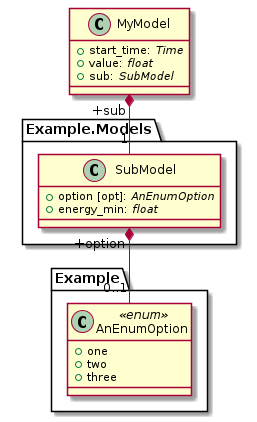
In a notebook, you can get a quick preview of PlantUML files using the following. There, the diagram images are not written to a file.
dm.PlantUMLDiagram(MyModel)

dm.PlantUMLDiagram.from_path("generated/plantuml/full_MyModel.plantuml")
